Past a dozen agents, even the radar is a lot to watch, and you end up polling panes. HQ takes the watching over. It is one of your own coding agents, started by gtmux in a tmux session of its own with a charter that teaches it the job: read the fleet, judge what matters, dispatch work, and bring you only what needs a person.
Start HQ
Install and sign in to the coding-agent CLI that HQ will run on, and install the gtmux
hook for the agents you use, HQ’s included (gtmux install hooks --agent <name>): the
hook’s events are what wake HQ. Then:
gtmux hq- With more than one supported agent installed, the first
gtmux hqasks which one should run HQ (Claude Code is the default when it is there) and remembers the answer.gtmux hq --agent codex, or theGTMUX_HQ_AGENTvariable, names it outright. Any supported agent can run HQ, but self-rotation works only with Claude Code and Codex. - HQ runs in its own tmux session,
Gtmux HQ, with its home in~/.config/gtmux/hq/. There is only ever one:gtmux hqfrom anywhere focuses it, or relaunches it in the same window if it quit. - To put it somewhere else:
--here(the pane you are typing in),--pane %N(an empty shell pane) or--new-pane(a fresh split of your window). Each refuses while an HQ is running. - Its first message is a startup briefing: one line on who it is, then a status table. On
the very first launch it ends by asking three questions (what you mainly work on, how you
want status reported, any quiet hours) and writes your answers into
LOCAL.md.
The charter HQ follows (AGENTS.md in its home) belongs to gtmux. After gtmux update,
the next gtmux hq regenerates it when a newer one shipped and keeps a backup. Your own
rules go in LOCAL.md, which upgrades never touch. HQ speaks
your language (GTMUX_LANG); gtmux hq --lang en|zh switches it.
What wakes HQ, and what stays quiet
HQ has no timer and tails nothing. When something happens that may need a decision, gtmux types one line into HQ’s pane:
» ◆ gtmux·waiting·permission  api:0.0 (%7) │ title:"run the tests?"
» ▸ gtmux·done  web:2.0 (%11) │ 3m │ goal:"fix the login bug" │ tail:"tests pass" · #a3f1c2
The mark after » is the weight: ◆ needs a decision, ▸ worth knowing, ·
bookkeeping. HQ then pulls the details itself (gtmux events, gtmux digest), judges in
a short turn, and answers in one line. What knocks:
| What happened | Line |
|---|---|
| an agent is waiting on you: a permission, a plan, a question | waiting·<kind> |
| that wait cleared, for example you answered in the pane | resolved |
| a reply ended with a question but no menu | asks |
| an agent finished work you were not watching | done |
| a turn died on an agent or API error | crash |
| you typed straight into an agent’s own pane | goal-changed |
| a new agent session appeared | new-session |
| a dispatch looks ready to reclaim | reap-suggest |
| a pane has waited on you too long | stuck·waiting |
| disk, memory, battery, plan limits or a session’s context crossed a line | resource·warn, limits·warn, usage·warn |
| remote access dropped or came back | tunnel |
an agent filed a blocking request with gtmux relay | agent-relay |
| wakes stopped reaching HQ | wake-degraded |
What stays quiet: ordinary progress never reaches HQ’s screen. By default a finish in the pane you are looking at is counted into the next brief instead of waking HQ, unless HQ is waiting on that pane because it spawned or sent work there. Several finishes in one pane are merged. A line is never typed over text half-written in HQ’s input box; it waits until the box is empty.
Three more knocks come from gtmux’s own clock rather than from an agent:
- The summary tick. At most every 10 minutes, sooner after 5 outcomes, and only when
something changed, HQ gets
tickand writes one brief of up to six lines. - The unread knock. The table above sets priority, not coverage. gtmux tracks how far HQ has read the event stream, and when events sit unread for two minutes it knocks with a count and where to read from. It repeats every five minutes until HQ reads them, so an event no line claims cannot go missing.
- Housekeeping.
self-checkabout daily anddistillabout weekly; see below.
» · gtmux·unread 7 unconsumed (%21 ×4 · %13 ×2 · control) │ pull: gtmux events --since-seq 6653 --jsonMuch of this runs in gtmux serve, the background process remote access also uses, so
keep it running. The agents’ hooks send the lines about a turn themselves
(waiting·<kind>, resolved, asks, done, crash, goal-changed, new-session, reap-suggest,
usage·warn), and gtmux relay sends agent-relay. Everything else comes from serve: the
three knocks above, stuck·waiting, resource·warn, limits·warn, tunnel,
wake-degraded and self-rotate, plus the reset that gtmux hq --rotate queues. A line
that had to wait, for an empty input box or for a pane’s merge window, goes out on serve’s
next pass a few seconds later, or at the next turn end.
"hqNudge": false in ~/.config/gtmux/config.json turns off only the hook-sent lines;
agent-relay and everything serve sends still arrive. The intervals are hqWake settings
(reference). Every line and its exact rule:
the wake channel.
The situation board
HQ keeps its picture of the fleet in ~/.config/gtmux/hq/notes/board.md, so a context
reset or a fresh session does not start from zero: HQ rereads the board before acting.
- At the top, a table with one row per live pane, named by its pane ID (
%23, the same IDgtmux focus %23takes), pruned when the work ends. - Below it, a handoff log, newest first.
- A
Still waiting on yousection for decisions that are yours. The phone and the menu bar lift it to the top; most of the time it is empty.
Read it with gtmux hq --board, the board button on the menu-bar HQ card, or Board on
the phone’s HQ page. It is the picture HQ last wrote, not the live radar, so check when it
was updated.
The Mac reader labels the standard sections Sessions and Handoff log, without numbers or sorting instructions. Supplementary content after the sessions table appears under HQ notes, collapsed until you open it to read the full record. Empty entries are hidden; decisions needing your input appear separately at the top. Pane IDs open the terminal; chevrons expand details. These display rules leave the source archive unchanged.
How HQ triages
Every event in the stream carries a severity, and HQ decides what to print by it:
important: an agent blocked, asking or crashed. Always printed.notable: changes across the fleet, such as an instruction reaching a session, a turn ending, a session starting or ending. Printed unless you turn quiet on.routine: written to the board and the ledger, not printed.
You can read the same stream yourself:
gtmux events --severity important    # what is blocked, asking or crashed
gtmux events --severity notable      # what changed across the fleet
gtmux events --since 24h --acts      # the last 24 hours of supervision: HQ's acts and gtmux's own triggers
A tool finishing mid-turn without ending a wait is not recorded at all. Before it passes on
“api needs you”, HQ checks the live state again and drops the item if you already
answered in that pane. Its answers to wake lines open with ⟣ and a glyph and take one
line each, except the periodic brief, which may add up to five indented lines, so they scan
apart from conversation:
| Reply | Means |
|---|---|
⟣ ✅ … | a completion worth knowing, and the next step |
⟣ ▪ noted: … | routine, written to the board |
⟣ 📓 captured: … | a lesson went into the knowledge base |
⟣ ⚠ … | something needs you |
⟣ ◈ brief … | the periodic brief |
When HQ decides and when it asks you
You can work with HQ three ways: dispatch something yourself, adopt a suggestion it made, or talk it through and let HQ decide. In the last case it acts on its own only when the step is reversible, low-risk and inside a direction you already discussed, and it says what it did and to whom. It brings the decision to you when the step:
- cannot be undone,
- touches permissions or credentials,
- changes the plan or the approach, or
- falls outside what you discussed.
It never answers another agent’s permission, plan or question prompt for you; it brings the prompt to you with its recommendation. It does not send arrow or Tab keys into an agent’s screen, and it runs no project commands itself: builds, git, even a read-only look at a repo go to an agent it picks or spawns.
When an instruction has two readings that lead to different work, HQ names the one it is taking in a sentence and starts. It stops to ask only when one reading cannot be undone, reaches outside this machine, or touches credentials.
Everything it escalates goes on your plate and stays there until it is answered:
gtmux tasks --pending # what is waiting on your decisionThis is a ledger HQ keeps: an item is on it because HQ put it there. The phone’s HQ →
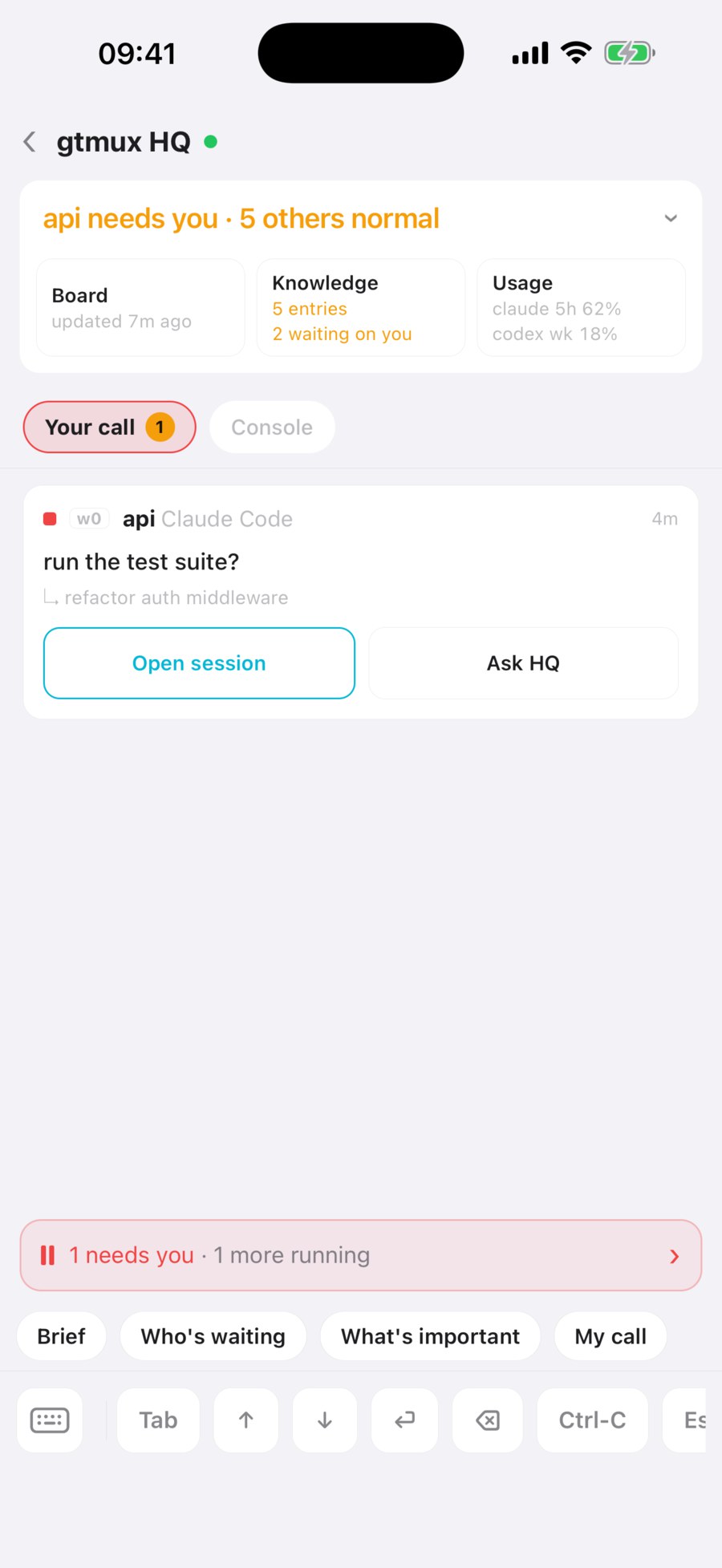
Your call is a different, live view: the agents waiting on you right now, oldest first.
gtmux advice --tally keeps HQ honest the other way: it counts how often its advice was
taken or declined.
Dispatch and reclaim work
You or HQ start work with gtmux spawn:
gtmux spawn --title fix-login --cwd ~/src/app "fix the login redirect loop"
gtmux spawn --title bump-deps --cwd ~/src/app --worktree chore/deps --goal-file /tmp/goal.txt
gtmux spawn --pane %14 "keep going, then run the tests"--titlenames the window with a short verb-object slug, and the report hands back<loc> (%pane) · <title>so you can jump by number.--cwdpicks the project,--worktree <branch>gives the agent its own git worktree, and--agentand--modelchoose who does the work. HQ sets both on every dispatch, the agent by what suits the work and the model by how hard the task is, and tells you which it picked.- A goal longer than a line goes through
--goal-file, so no shell touches the text. - Delivery is verified: gtmux waits until the agent is ready, pastes the goal, and
confirms it arrived, from the agent’s own prompt event where a hook exists or by reading
the screen. A failure prints
✗ not delivered → <loc> (%pane) · <title>. Evidence:followed by what it saw, and running the same spawn again reuses what the first attempt created. - Neither
spawnnorgtmux sendtypes into an input box that holds someone else’s unsent text: they refuse and quote the draft back.
Track and reclaim:
gtmux tasks                        # every dispatch and its live state, undelivered and waiting first
gtmux reap <task_id>               # close a finished dispatch
gtmux reap <task_id> --snooze      # keep it: no reap suggestion for 24 hours (--for 72h sets another span)
reap checks that the worktree is clean and the branch is merged, and only then closes the
session, removes the worktree and deletes the branch; otherwise it says what blocks it and
changes nothing. HQ proposes a reap when one looks ready (reap-suggest) and runs it only
after you agree.
Agents can talk to HQ too. From a worker pane, gtmux relay report files progress and
gtmux relay ask files a question. A request wakes HQ when it blocks: every ask unless
it carries --nonblocking, and a report with --blocking or --for user; the rest wait
quietly in the ledger. A decision only you can make (--for user) still comes to you: HQ
cannot approve it for you (relay).
Ask HQ things
HQ is an agent session: type to it in its pane, or from the phone.
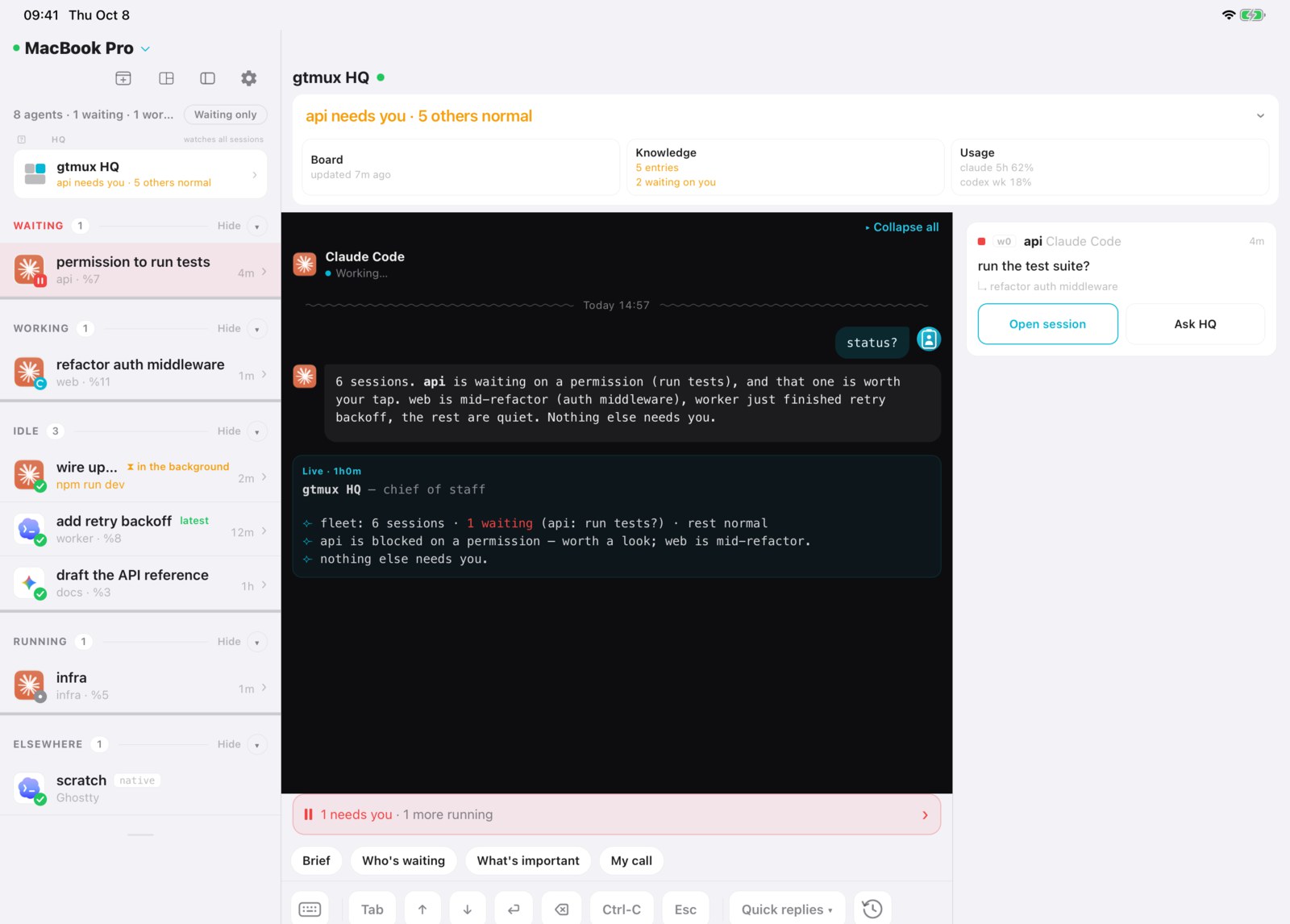
- Ask for “status” and you get a table: who needs you first, then what is working and what finished, token use, and how much of your plan window is left.
- The phone’s HQ page has one-tap prompts: Brief, Who’s waiting, What’s important and My call.
- The menu-bar popover shows HQ as its own card above the sessions. Click it to jump to HQ’s pane; the icons in its header open the board and the knowledge base.
- On iPad, HQ’s conversation sits beside what is waiting on you and what HQ did.
Knowledge, and learning from corrections
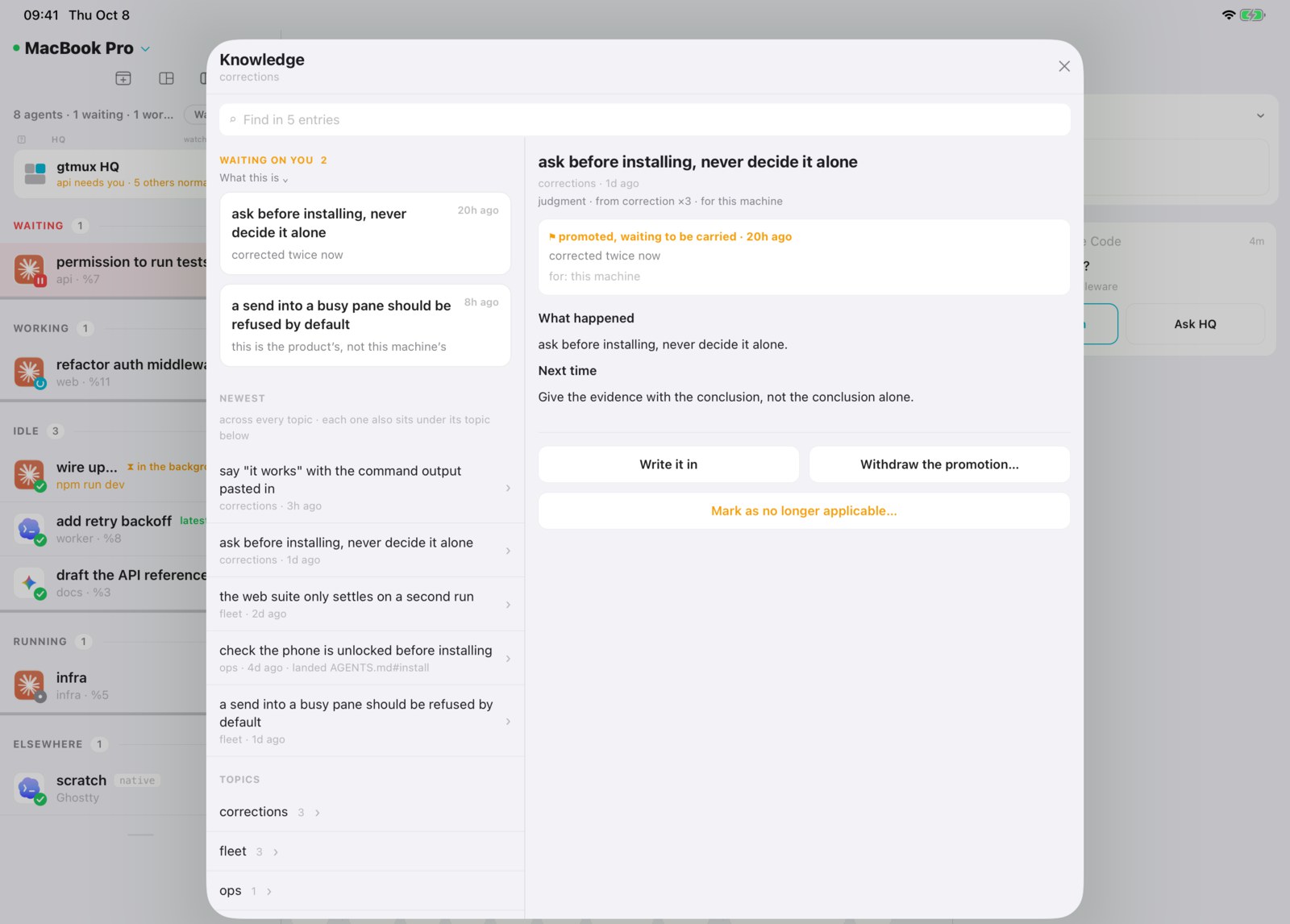
HQ keeps a knowledge base of what it learns: how an account’s login works, a network quirk, a footgun someone already paid for.
- When you correct HQ, an agent crashes, or the same trap is hit a second time, HQ either
files a lesson (
⟣ 📓 captured) or says in a clause why there is nothing lasting in it. - Any agent can drop a candidate:
gtmux capture "wrangler TLS-resets on the office network; retry @pitfalls". Once a day gtmux also reads the agents’ session logs, with no model, and queues the places where you corrected an agent or a tool failed again and again. About once a week (distill) HQ files or dismisses each candidate, with a reason. - Before it advises you or dispatches work, HQ searches the base and names the entry its
advice rests on.
gtmux spawnprints matching entries before it dispatches. - A lesson bigger than this machine gets promoted: into
LOCAL.md, to every agent on this Mac, into one repository’sAGENTS.md, or to gtmux itself as a pre-filled issue. - Your own details, such as an account or a personal fact, go in only after HQ shows you the exact text and you say yes.
Where the base lives, the commands, and what you can change yourself: What HQ remembers.
Your own rules: LOCAL.md
~/.config/gtmux/hq/LOCAL.md is yours. It is imported at the end of the charter, so what
you write there extends and overrides what gtmux ships, and no upgrade overwrites it. For
example:
- I mostly work on the api and web repos; the mobile app can wait.
- Report in one short table, no prose.
- Quiet hours 22:00–08:00: interrupt me only for something blocked.
If you want HQ to always do something, write it in LOCAL.md. If you want it to remember
something it worked out, that is the knowledge base: a correction you give HQ in
conversation becomes an entry there, and one that should govern HQ from then on can be
promoted into LOCAL.md as a marked section.
Self-check and self-rotation
HQ has no clock, so gtmux raises its housekeeping:
self-check, about daily: HQ tidies its own records (stale entries in its ledger, the event log’s health, the knowledge base’s lint report) and says nothing unless it did real work.distill, about weekly, sooner once five captures are queued: it folds the period’s lessons into the knowledge base and prunes stale ones.
gtmux doctor flags either one when it is overdue.
Self-rotation. Deep into a long, nearly full session, an agent starts to mix up what it
wrote with what it was told, and it cannot catch that from the inside. So gtmux watches
HQ’s session from outside and knocks self-rotate when one of these crosses its line:
context 75% full, 12 hours old, or 300 turns. Without asking you, HQ then brings the board
and the knowledge base up to date, writes a handoff, and runs gtmux hq --rotate. gtmux
sends the agent’s own reset (/clear for Claude Code, /new for Codex) after the turn ends
and only into an empty input box, and only a new session ID counts as done. The next session
reads the board and carries on. Those are the only two reset commands gtmux knows: with any
other agent running HQ, --rotate refuses, and a fresh session means exiting the agent and
running gtmux hq again. The lines are hqWake settings, and gtmux doctor’s HQ
conversation health row shows the current figures
(details).
How much HQ says: gtmux quiet
gtmux quiet on       # only CRITICAL reaches you
gtmux quiet off      # clear the quiet switch
gtmux quiet status   # what is in effect now
quiet off clears only the switch: surfaceTier in config.json, or GTMUX_SURFACE_TIER
and GTMUX_QUIET for one process, can still set the bar. With none of them it is NORMAL
and above, and quiet status shows what is in effect. Quiet changes what HQ prints, not what it records. One thing is never quieted: a
gap in the event log, which means HQ may have missed something.
Move HQ to another Mac
HQ’s records (the board, the knowledge base and your LOCAL.md) are the one thing gtmux
holds that it cannot rebuild. Export them as one passphrase-locked file:
gtmux hq --export ~/gtmux-hq.tar.gz        # asks for a passphrase, writes gtmux-hq.tar.gz.age
gtmux hq --import ~/gtmux-hq.tar.gz.age    # on the other Mac, with HQ not running
gtmux hq --records                         # size, backup state, last export
--import replaces the whole home: the one already there is moved aside to a sibling
folder named hq.replaced-…, and the path is printed. Run gtmux hq afterwards so HQ starts
from the restored board.
Lose the passphrase and the file stays shut; gtmux keeps no copy. The rest of a move
(hooks, pairing the phone again) is in Moving to a new Mac.
To bring over only the knowledge base or LOCAL.md and review it first, use
gtmux hq migrate, or the menu bar’s HQ → Knowledge → Import… → Move from another Mac…
(selective migration).
gtmux serve also snapshots the records daily to ~/.local/share/gtmux/hq-snapshots/
and keeps 14. They sit on the same disk, so keep an export somewhere else too.
Next: Manage from your phone and the web ·
Attach from any computer · Every flag:
gtmux hq in the CLI reference
Source: docs/guides/hq-supervisor.md at v1.0.114 · Edit on GitHub
agent 一多,连雷达也盯不过来,最后还是你在挨个查 pane。HQ 把盯梢接过去。它就是你自己的一个 coding agent,由 gtmux 放在一个专属 tmux 会话里,带着一份写好职责的章程:看全局、判断轻重、派活,只把需要人拍板的事交给你。
启动 HQ
先装好并登录 HQ 要用的 coding agent CLI,再给你在用的 agent(包括 HQ 自己)装上 gtmux hook(gtmux install hooks --agent <名字>):唤醒 HQ 靠的就是 hook 上报的事件。然后:
gtmux hq- 装了不止一个受支持的 agent 时,第一次
gtmux hq会问用哪个来跑 HQ(有 Claude Code 就默认它),并记住你的选择。gtmux hq --agent codex或环境变量GTMUX_HQ_AGENT可以直接指定。受支持的 agent 都能跑 HQ,但自轮换只支持 Claude Code 和 Codex。 - HQ 跑在自己的 tmux 会话
Gtmux HQ里,家目录是~/.config/gtmux/hq/。HQ 永远只有一个:在哪儿敲gtmux hq都是切过去;它退出了,就在原窗口重新拉起。 - 想换个位置:
--here(你正敲命令的这个 pane)、--pane %N(一个空 shell pane)、--new-pane(在当前窗口拆一个新 pane)。已有 HQ 在跑时三者都会拒绝。 - 它的第一条消息是启动简报:一句自我介绍,加一张现状表。第一次启动时,简报最后会问你三个问题(主要在做什么、想怎么收汇报、有没有免打扰时段),并把回答写进
LOCAL.md。
HQ 遵循的章程(家目录里的 AGENTS.md)归 gtmux 所有。gtmux update 之后,如果带来了新版章程,下次 gtmux hq 会重新生成,旧的留备份。你自己的规矩写在 LOCAL.md,升级永远不碰它。HQ 跟随你的语言(GTMUX_LANG),gtmux hq --lang en|zh 可以切换。
什么会叫醒 HQ,什么不会
HQ 没有定时器,也不盯日志。发生了可能要拍板的事,gtmux 往 HQ 的 pane 里敲一行:
» ◆ gtmux·waiting·permission  api:0.0 (%7) │ title:"run the tests?"
» ▸ gtmux·done  web:2.0 (%11) │ 3m │ goal:"fix the login bug" │ tail:"tests pass" · #a3f1c2
» 后面那个符号是分量:◆ 要拍板,▸ 值得知道,· 记账。HQ 随后自己去拉细节(gtmux events、gtmux digest),用一个短回合判断完,回一行。会敲门的事:
| 发生了什么 | 那一行 |
|---|---|
| 有 agent 在等你:授权、计划或提问 | waiting·<kind> |
| 那个等待解除了,比如你已经在 pane 里回了 | resolved |
| 回复末尾问了个问题,但没给菜单 | asks |
| 一个你没在看的 agent 干完了活 | done |
| 这一回合死在 agent 或 API 报错上 | crash |
| 你直接在某个 agent 自己的 pane 里下了指令 | goal-changed |
| 出现了一个新的 agent 会话 | new-session |
| 某次派活看起来可以收尾了 | reap-suggest |
| 某个 pane 等你太久了 | stuck·waiting |
| 磁盘、内存、电量、订阅额度或某个会话的上下文越线 | resource·warn、limits·warn、usage·warn |
| 远程访问断了或恢复了 | tunnel |
有 agent 通过 gtmux relay 提了一个阻塞请求 | agent-relay |
| 唤醒送不到 HQ 了 | wake-degraded |
不会打扰它的:普通的进展永远不上 HQ 的屏幕。默认情况下,你正看着的 pane 干完活不叫醒它,只记进下一条简报;但如果这个 pane 的活是 HQ 派的(spawn 或 send 过去的),HQ 在等它,照样会被叫醒。同一个 pane 连着完成几次会合并成一条。HQ 输入框里有写了一半的字时绝不往里敲,等输入框空了再送。
还有三种不是 agent 触发、而是 gtmux 按钟点来敲的:
- 定时简报:最多每 10 分钟一次,攒够 5 个结果会提前,而且只在真有变化时才来。HQ 收到
tick,写一条不超过六行的简报。 - 未读提醒:上面那张表管的是先后,不管全不全。gtmux 记着 HQ 读到了事件流的哪儿,事件压了两分钟没读,就敲门报一个数和从哪儿读;之后每五分钟再敲,直到 HQ 读完。所以哪一类都没认领的事件也丢不了。
- 家务:
self-check约每天一次,distill约每周一次,见下文。
» · gtmux·unread 7 unconsumed (%21 ×4 · %13 ×2 · control) │ pull: gtmux events --since-seq 6653 --json这里不少事靠 gtmux serve(远程访问用的也是这个后台进程),所以它得一直在跑。关于回合的那些行由各 agent 的 hook 直接发(waiting·<kind>、resolved、asks、done、crash、goal-changed、new-session、reap-suggest、usage·warn),agent-relay 由 gtmux relay 发;其余都来自 serve:上面这三种,stuck·waiting、resource·warn、limits·warn、tunnel、wake-degraded、self-rotate,还有 gtmux hq --rotate 排队的那次重置。因为输入框不空、或者落在某个 pane 的合并时间窗里而暂缓的行,由 serve 几秒后的下一轮送出,或者等到下一个回合结束。
在 ~/.config/gtmux/config.json 里写 "hqNudge": false 只关掉 hook 发的那些行,agent-relay 和 serve 发的照样会到。间隔在 hqWake 里调(参考)。每一类的完整规则见唤醒通道。
态势板
HQ 把它对全局的判断写在 ~/.config/gtmux/hq/notes/board.md。上下文重置或换了新会话,它先重读态势板再动手,不用从零摸起。
- 上面是一张表,每个在跑的 pane 一行,用 pane ID 命名(
%23,和gtmux focus %23用的是同一个),活干完就删。 - 下面是交接记录,新的在最上面。
- 「还等你定的」一节专放需要你决定的事,手机和菜单栏会把它提到最顶上;大多数时候它是空的。
用 gtmux hq --board、菜单栏 HQ 卡片上的态势板按钮,或手机 HQ 页的态势板来看。它是 HQ 最近一次写下的样子,不是实时雷达,看的时候留意更新时间。
菜单栏阅读窗将标准分区显示为会话概览和交接记录,不显示编号和排序说明。 会话表格后的补充信息放在默认收起的HQ 备注中,点击可查看完整记录。 空栏目不显示;需要你处理的事项单独置顶。窗格编号用于跳转,箭头用于展开详情。 这些是显示方式的调整,不改变原始档案。
HQ 怎么分轻重
事件流里每条事件都带严重度,HQ 按它决定说不说:
important:有 agent 卡住、在问或崩了。一定说。notable:全局有变化,比如一条指令送到了某个会话、一个回合结束、会话起停。除非你开了 quiet,否则会说。routine:只记进态势板和台账,不说。
同一条事件流你也能自己读:
gtmux events --severity important    # 谁卡住了、在问、崩了
gtmux events --severity notable      # 全局有什么变化
gtmux events --since 24h --acts      # 最近 24 小时的监督记录:HQ 的动作,加上 gtmux 自己发起的触发
回合中途某个工具跑完、又没解除任何等待的,根本不记。转告「api 在等你」之前,HQ 会再看一眼实时状态,你已经在那个 pane 里回过了,它就不再转。它回复唤醒行都以 ⟣ 加一个符号开头,每条一行,只有定时简报可以再带最多五行缩进,所以和对话一眼分得开:
| 回复 | 意思 |
|---|---|
⟣ ✅ … | 一次值得知道的完成,以及下一步 |
⟣ ▪ noted: … | 例行事项,已记进态势板 |
⟣ 📓 captured: … | 一条经验进了知识库 |
⟣ ⚠ … | 有事要你定 |
⟣ ◈ 简报 … | 定时简报 |
HQ 什么时候自己定,什么时候问你
和 HQ 配合有三种方式:你自己派,采纳它的建议,或者和它商量完让它定。最后这种情况下,只有一步可撤销、低风险、而且在你们已经谈过的方向之内,它才自己做,并说清做了什么、交给了谁。下面这些它会交回给你:
- 做了就撤不回的,
- 碰到权限或凭据的,
- 改变计划或做法的,
- 超出你们谈过的范围的。
别的 agent 弹出的授权、计划或提问,它绝不替你回答,而是带着建议转给你。它不往 agent 的界面里发方向键或 Tab,也不亲自跑项目里的命令:构建、git,哪怕只是看一眼仓库,都交给它挑中或新起的 agent。
一条指令有两种理解、会做出不同的活时,HQ 用一句话说明它按哪种理解,然后直接开始。只有其中一种理解撤不回、会伸出这台机器、或碰到凭据时,它才停下来问。
交给你的事都会放上你的待办,答完才撤下:
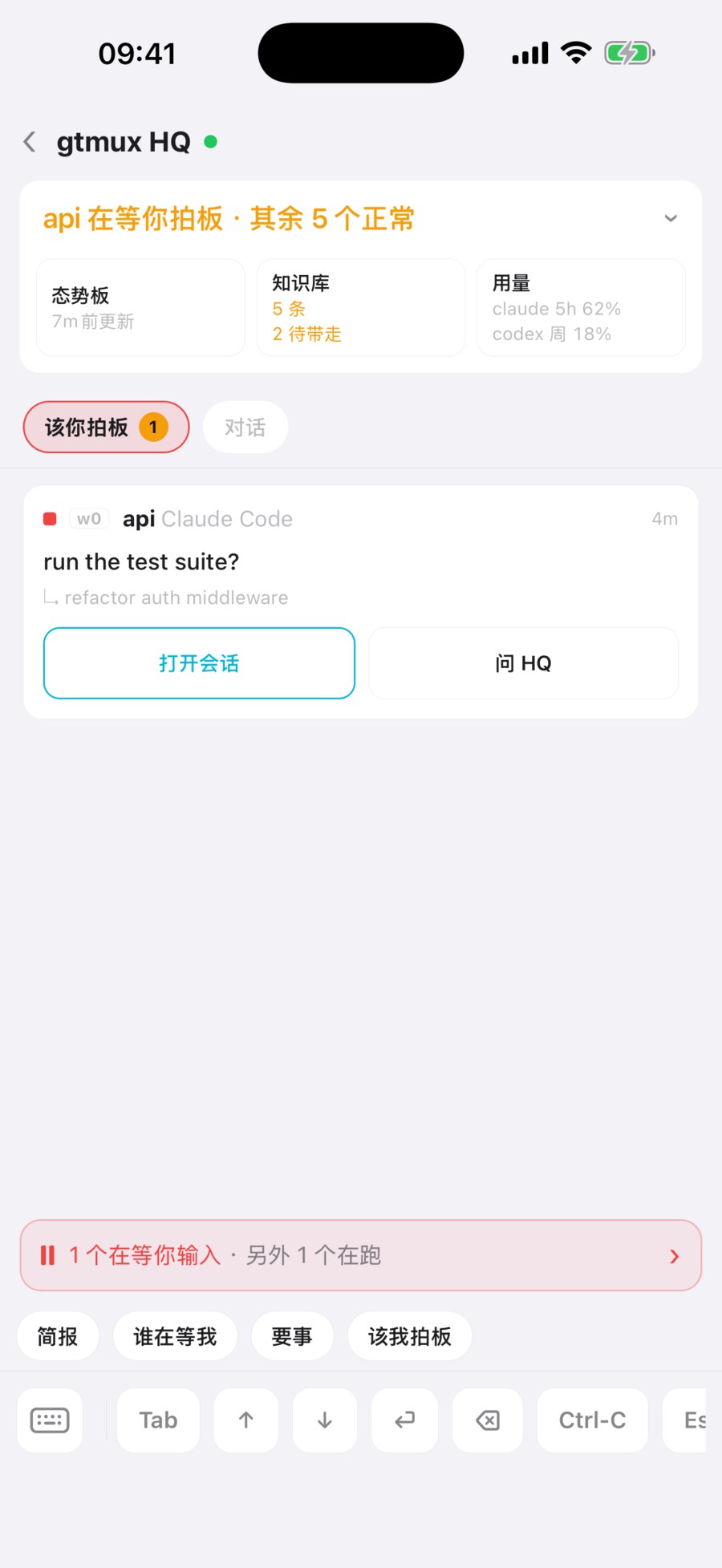
gtmux tasks --pending # 等你拍板的事这是 HQ 记的一本账,上面的每一项都是 HQ 放上去的。手机上 HQ → 该你拍板 是另一回事:它实时列出此刻在等你的 agent,等得最久的在前。反过来,gtmux advice --tally 记着它提的建议被采纳和被否的次数。
派活与收尾
你或 HQ 都用 gtmux spawn 开工:
gtmux spawn --title fix-login --cwd ~/src/app "fix the login redirect loop"
gtmux spawn --title bump-deps --cwd ~/src/app --worktree chore/deps --goal-file /tmp/goal.txt
gtmux spawn --pane %14 "keep going, then run the tests"--title用一个「动词-宾语」的短名给窗口起名,回报里给出<loc> (%pane) · <title>,按编号就能跳过去。--cwd指定项目,--worktree <分支>给 agent 一个独立的 git worktree,--agent和--model决定谁来干。HQ 每次派活都把这两项定下来:agent 看哪个适合这件活,模型看任务有多难,并告诉你选了什么。- 超过一行的任务写进文件,用
--goal-file交出去,文字不经过 shell。 - 送达是核验过的:gtmux 等 agent 就绪,把任务贴进去,再确认它真收到了(有 hook 的看 agent 自己的提交事件,没有就读屏幕)。没送到会打印
✗ 未送达 → <loc> (%pane) · <title>。证据:,后面是它看到的东西;同一条 spawn 再跑一次,会接着用上次建好的东西。 - 输入框里有别人没发出去的字时,
spawn和gtmux send都不往里敲,而是拒绝,并把那段草稿原样给你看。
跟踪和收尾:
gtmux tasks                        # 每次派活和它的实时状态,没送到的和在等的排前面
gtmux reap <task_id>               # 收掉一次干完的派活
gtmux reap <task_id> --snooze      # 留着:24 小时内不再建议回收(--for 72h 换个时长)
reap 先确认 worktree 干净、分支已合并,才会关会话、删 worktree、删分支;否则只说明卡在哪,什么都不动。HQ 看到能收尾的会提议(reap-suggest),你同意了才执行。
agent 也能找 HQ。在干活的 pane 里,gtmux relay report 报进度,gtmux relay ask 提问。阻塞的请求才会叫醒 HQ:ask 默认就是阻塞的(加 --nonblocking 才不是),report 要带 --blocking 或 --for user;其余的安静地记进台账。只有你能拍板的事(--for user)照样回到你手里,HQ 替不了你(relay)。
向 HQ 提问
HQ 就是一个 agent 会话:在它的 pane 里打字,或者在手机上问。
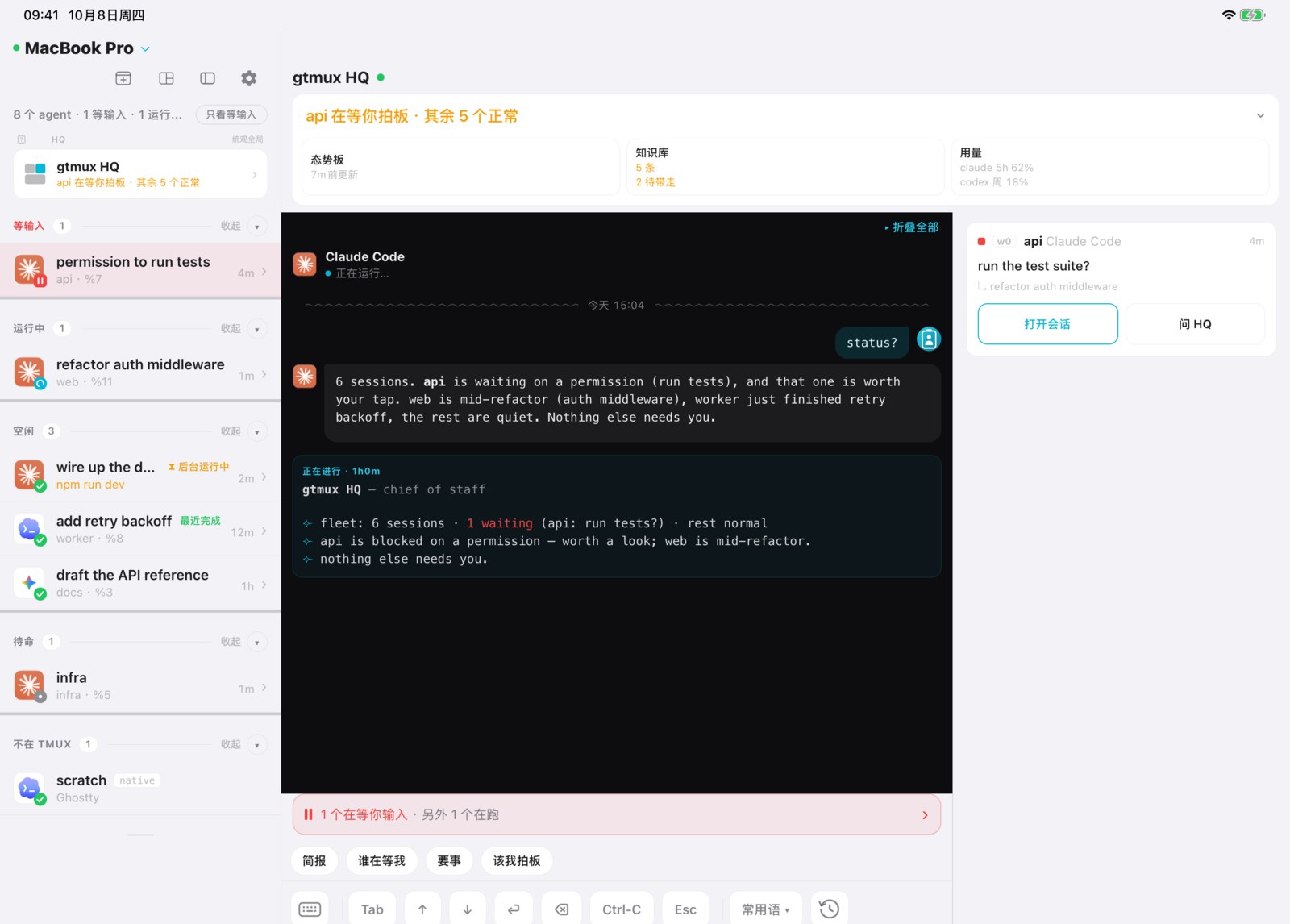
- 问「status」会得到一张表:先列等你的,再列在跑的和跑完的,还有 token 用量和订阅窗口剩多少。
- 手机 HQ 页有一键提问:简报、谁在等我、要事、该我拍板。
- 菜单栏面板里,HQ 是会话列表上方单独的一张卡片。点它跳到 HQ 的 pane,卡片标题栏的图标打开态势板和知识库。
- iPad 上,HQ 的对话旁边就是等你的事和 HQ 做过的事。
知识库,以及从纠正里学习
HQ 把学到的东西记进知识库:某个账号怎么登录、某个网络的毛病、别人已经踩过的坑。
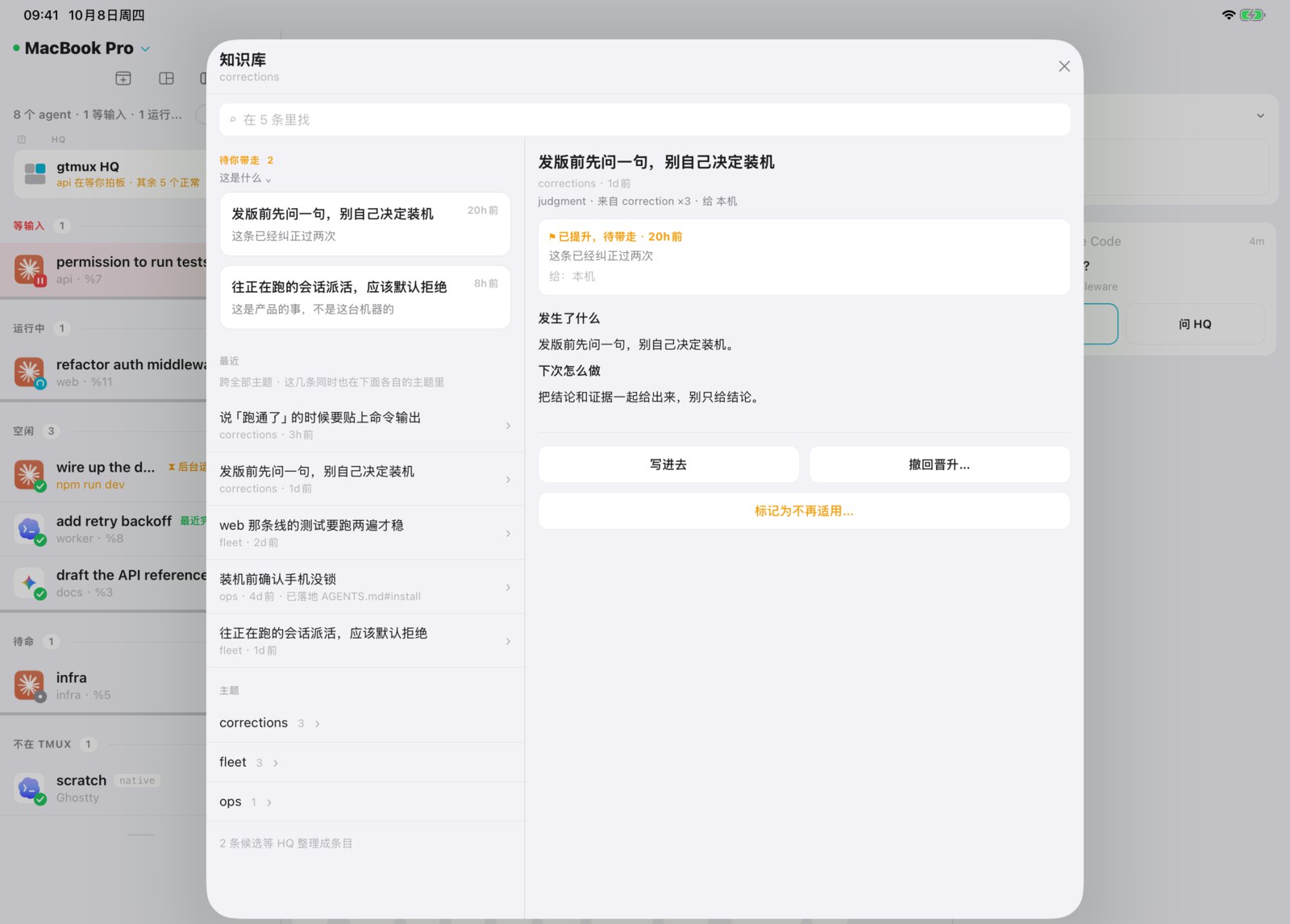
- 你纠正了 HQ、某个 agent 崩了、或者同一个坑踩到第二次时,HQ 要么记下一条经验(
⟣ 📓 captured),要么用一句话说明为什么没有值得留的东西。 - 任何 agent 都能投一条候选:
gtmux capture "wrangler TLS-resets on the office network; retry @pitfalls"。gtmux 每天还会读一遍各 agent 的会话日志(不调用模型),把你纠正 agent 的地方和反复失败的工具排进队列。大约每周一次(distill),HQ 逐条归档或驳回,并写明理由。 - 给你建议或派活之前,HQ 先查知识库,并说出它的建议依据哪一条。
gtmux spawn派活前也会列出相关条目。 - 超出这台机器的经验会被提升:进
LOCAL.md、给这台 Mac 上的所有 agent、进某个仓库的AGENTS.md,或者以预填好的 issue 交给 gtmux 本身。 - 你自己的信息(账号、个人情况)只有在 HQ 把原文给你看过、你点头之后才会记。
知识库存在哪、有哪些命令、你自己能改什么,见 HQ 记住的东西。
你自己的规矩:LOCAL.md
~/.config/gtmux/hq/LOCAL.md 归你。它在章程末尾导入,所以你写的会补充并覆盖 gtmux 自带的内容,任何升级都不会覆盖它。比如:
- 我主要做 api 和 web 两个仓库,手机 app 可以往后放。
- 汇报用一张短表,不要大段文字。
- 22:00–08:00 免打扰:只有卡住的事才叫我。
想让 HQ 一直照做的,写进 LOCAL.md;想让它记住自己摸索出来的,那是知识库的事。你在对话里给 HQ 的纠正会变成知识库里的一条;如果它应该从此约束 HQ 本身,可以提升进 LOCAL.md,作为带标记的一节。
自检与自轮换
HQ 没有时钟,家务由 gtmux 来提醒:
self-check,约每天一次:HQ 整理自己的档案(台账里过期的条目、事件日志是否健康、知识库的检查报告),没做实事就不出声。distill,约每周一次,攒够五条候选会提前:把这段时间的经验折进知识库,剪掉过期的。
哪一项过期没做,gtmux doctor 都会标出来。
自轮换。 会话又长又满时,agent 会开始分不清哪些是自己写的、哪些是别人说的,而且从里面察觉不到。所以 gtmux 从外面盯着 HQ 的会话,上下文用到 75%、会话满 12 小时、或者满 300 个回合,任一条越线就敲 self-rotate。HQ 不问你,直接把态势板和知识库更新到位、写好交接,再执行 gtmux hq --rotate。gtmux 等这一回合结束、输入框为空时,才发出 agent 自己的重置命令(Claude Code 是 /clear,Codex 是 /new),只有出现新的会话 ID 才算完成。新会话读完态势板接着干。gtmux 只认识这两个重置命令:换成别的 agent 当 HQ,--rotate 会拒绝,要开新会话就得退出 agent,再跑一次 gtmux hq。这几条线是 hqWake 设置,gtmux doctor 的 HQ 会话健康那一行显示当前数值(详情)。
HQ 说多少:gtmux quiet
gtmux quiet on       # 只有 CRITICAL 才会到你面前
gtmux quiet off      # 关掉 quiet 开关
gtmux quiet status   # 现在生效的是哪档
quiet off 只关这个开关:config.json 里的 surfaceTier,以及单个进程的 GTMUX_SURFACE_TIER、GTMUX_QUIET,仍然能定门槛;都没有时是 NORMAL 及以上,quiet status 显示实际生效的那档。quiet 只改 HQ 说什么,不改它记什么。只有一件事永远不静音:事件日志出现缺口,意味着 HQ 可能漏看了东西。
把 HQ 搬到另一台 Mac
HQ 的档案(态势板、知识库和你的 LOCAL.md)是 gtmux 里唯一没法重建的东西。导出成一个带口令的文件:
gtmux hq --export ~/gtmux-hq.tar.gz        # 要你设口令,写出 gtmux-hq.tar.gz.age
gtmux hq --import ~/gtmux-hq.tar.gz.age    # 在另一台 Mac 上,先退出 HQ
gtmux hq --records                         # 大小、备份情况、上次导出
--import 替换整个家目录:原来的会挪到旁边一个名为 hq.replaced-… 的文件夹,路径会打印出来。之后跑一次 gtmux hq,让 HQ 从恢复的态势板开始。口令丢了文件就打不开,gtmux 不留副本。换机的其余步骤(hook、手机重新配对)见换一台 Mac。
只想搬知识库或 LOCAL.md、并且先过目,用 gtmux hq migrate,或者菜单栏的 HQ → 知识库 → 导入… → 从另一台 Mac 迁移…(选择性迁移)。
gtmux serve 每天还会把档案快照到 ~/.local/share/gtmux/hq-snapshots/,保留 14 份。它们和原件在同一块硬盘上,所以导出的文件另存一处。
接下来:用手机和网页远程管理 · 从任意电脑接回会话 · 全部参数:CLI 参考里的 gtmux hq
来源:docs/guides/hq-supervisor.zh.md(v1.0.114)· 在 GitHub 上编辑